Emoji-based battery themes and status bar customization for Android
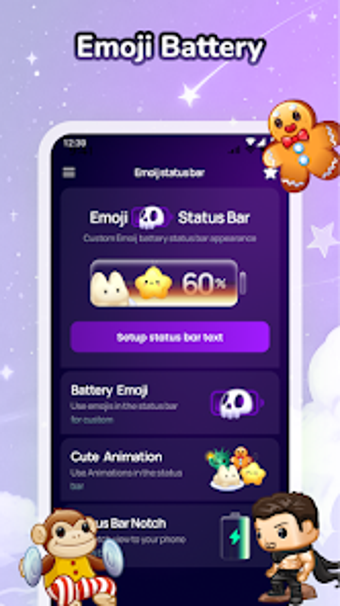
Emojify: Battery Themes, from Desolator Lab, turns the system battery indicator into expressive emoji visuals that reflect charge levels. The app replaces the stock battery bar with hundreds of emoji icons, and adds status bar and notch personalization plus charging animations and gesture shortcuts for navigation. It targets Android users who prefer playful, kawaii-style UI tweaks and who want visible, characterful system indicators without rooting their device.
Replaces the battery bar with reactive emoji icons
Emojify substitutes the standard battery display with a library of hundreds of emoji designs that change expression by charge level, providing live battery tracking and charging animations that activate when the device is plugged in. The reactive icons show different moods for high, medium, and low power, so the visual indicator communicates status at a glance rather than relying solely on a numeric percentage.
Offers granular control of status bar, notch, and gesture behavior
The app exposes controls for status bar layout, color, and icon size, plus notch overlays such as rounded edges, hearts, or stickers. Gesture shortcuts let users assign taps and swipes on the status bar to actions like screenshots, returning home, or opening notifications. These controls let the user shape both look and interaction across system UI elements without native theming tools.
Runs as a lightweight overlay but requires Accessibility Service
Emojify uses the Accessibility Service API to place custom icons and overlays on the status bar, so it operates without root while integrating deeply with the system UI. The developer states the design is lightweight, aiming for high-quality animations with minimal performance overhead. Compatibility relies on the same overlay APIs, and the app states support for modern Android builds including Android 15.
Accessible for casual customizers yet needs a permissions step
Setup requires enabling Accessibility permissions to grant the overlay capability, a single explicit step in system settings rather than rooting. Gesture assignment and theme selection happen inside the app, which keeps daily use straightforward for users comfortable granting that permission. User feedback notes appreciation for the creative approach, especially among people who favour kawaii or playful desktop accents.
Tight fit for expressive customizers who accept permission trade-offs
Emojify is a playful option for Android users who want visible, character-driven system accents and who accept granting overlay permissions. It suits people seeking non-root customization that changes how the device communicates power status. Users who avoid background overlays or strict permission grants should consider their tolerance for system permissions before installing.